TLS/SSL Connection
Hi bugs! Currently, I’m working around security protocols and decided to start a blog series to revive my knowledge of the sacred art (cryptography) of protecting our digital world from the darkness of evil spirits (yes, I’m talking about attackers). Those who don’t know me yet, I’m someone you can’t have just overnight, so subscribe to my blogs and connect with me on LinkedIn to always stay under my divine protection 😏.
As you can tell from the title, today we will explore TLS/SSL connections and how they work to secure our websites and web servers. Buckle up, because this is just the beginning of what might feel like a heavy rain, maybe even a little storm of knowledge.
What is TLS?
TLS (Transport Layer Security) is the widely adopted security protocol that’s been protecting data privacy and communication security over the internet since 1999. You’ll find TLS everywhere, encrypting communication between web applications and servers, securing your emails, protecting VoIP calls, and much more. The Internet Engineering Task Force (IETF) first proposed this protocol, and we’re currently using TLS 1.3, which was published in 2018.
But here’s something that might have confused you and if it did, you’re one of the pure souls (learner mentality), my friend — why do we often see SSL and TLS used interchangeably, or at least separated by a “/”?
TLS/SSL Story
SSL (Secure Sockets Layer) was the encryption protocol that ruled the internet before TLS came along. Netscape developed SSL, and here’s the interesting part, TLS version 1.0 is actually SSL version 3.1. When the protocol developed, it was renamed to TLS to show it was no longer tied to Netscape. That’s exactly why you see these terms used together so often.
When you hear that HTTPS is more secure than HTTP, you’re witnessing TLS in action. HTTP incorporated TLS encryption into its mechanism to protect data traveling across the internet. Thankfully, this has become standard practice for websites today.
Understanding TLS/SSL Certificates
A TLS/SSL certificate is a digital certificate issued by a Certificate Authority (CA) that certifies ownership of a domain through a public key. The CA digitally signs this certificate, which means if you trust the CA, you can confidently trust that the public key belongs to the legitimate owners of that domain. These certificates follow the X.509 standard, so you’ll often hear them called X.509 certificates interchangeably with TLS certificates.
The certificate ecosystem works through a hierarchical chain of trust with three main types:
Root CAs sit at the top of the trust hierarchy. These are self-signed entities that serve as the ultimate source of trust for the entire system. The security of everything depends on keeping the root CA’s private key safe, which is why it’s typically stored offline. Some well-known public CAs include DigiCert, GlobalSign, Let’s Encrypt, and VeriSign.
Intermediate CAs work as the middle layer, inheriting trust from root CAs and signing certificates for end-entities. This hierarchical approach limits the risk exposure because if an intermediate CA gets compromised, it doesn’t directly threaten the root CA’s security.
End-Entity Certificates (Leaf Certificates) are issued to websites, email servers, or individuals.
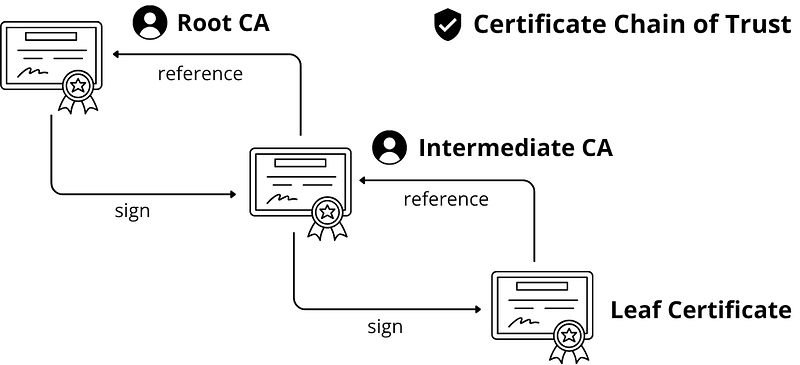
Think of it this way: Root CAs self-sign their certificates and are trusted by default. Root CAs sign intermediate CA certificates, and these intermediate CAs sign the leaf-level certificates like your website’s server certificate.
Certificate Issuance (Pre-TLS Handshake)
Before any TLS handshake can happen, servers need to obtain their certificates through a specific process:
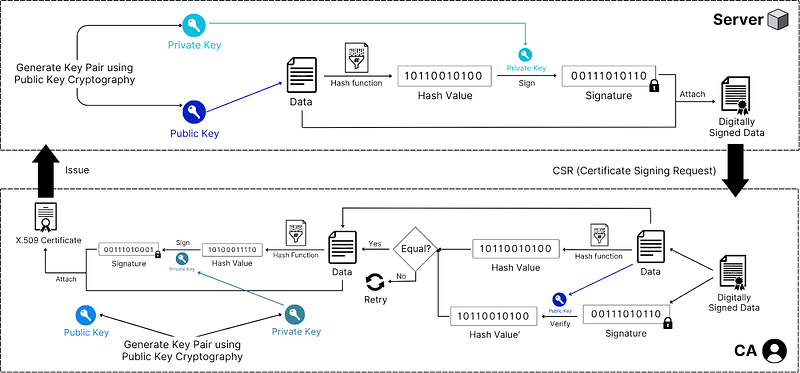
Step 1: Certificate Signing Request (CSR) Generation
Server generates a public-private key pair
Server creates a data containing its public key, domain name, organization details, and other identifying information
This data is first passed through a hashing function then, signed with the server’s private key to create CSR
Step 2: CA Verification and Signing
Server submits CSR to Certificate Authority (CA)
CA verifies the server’s identity through domain validation, organization validation, or extended validation
CA creates certificate data containing: server’s public key, domain name, validity period, CA information, and certificate policies
CA hashes this certificate data using a cryptographic hash function (typically SHA-256)
CA signs the hash with its private key, creating a digital signature
CA combines the certificate data and signature to form an X.509 certificate
Step 3: Certificate Distribution
CA issues the certificate to the server
Server installs the certificate and can now present it during TLS handshakes
TLS Handshake
Now comes the exciting part, how TLS actually works when you visit a website:
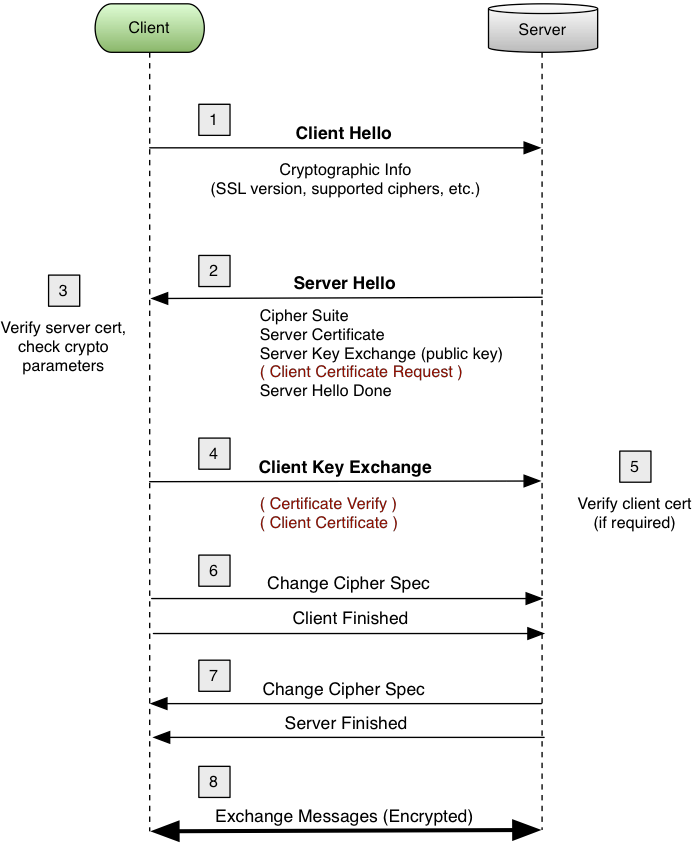
Step 1: Client Hello
- Client initiates connection and sends supported TLS versions, cipher suites, and random number
Step 2: Server Hello
Server responds with chosen TLS version, cipher suite, and its random number
Server sends its certificate chain (server cert + intermediate CA certs)
Note: You might wonder why the server sends the entire certificate chain instead of just its own certificate. Here’s the thing: when a client receives only the server certificate, it can see issuer information like “Intermediate CA X,” but that’s just metadata — not the actual cryptographic material needed for verification. The server certificate essentially says “I was signed by Intermediate CA X,” but the client needs the actual intermediate CA certificate containing its public key to verify that signature. And the client uses Root CA’s public key (pre-installed in the client’s trust store) to verify intermediate certificate signatures.
Step 3: Certificate Verification
Client extracts the certificate data and signature
Client identifies the issuing CA from certificate information
Client uses CA root certificates pre-installed in its trust store (doesn’t contact CA for public key)
Client uses the CA’s public key (from trust store) to verify the signature
Client hashes the certificate data using the same algorithm specified in the certificate
Client compares the verified hash with the computed hash — if they match, the certificate is authentic
Client verifies certificate validity period, domain name matching, and certificate chain up to a trusted root
Step 4: Key Exchange
Client generates a pre-master secret, encrypts it with server’s public key (from verified certificate), and sends it
Both parties derive the master secret and session keys from the pre-master secret and random numbers
Step 5: Finished Messages
Both parties send encrypted “Finished” messages using the derived session keys
This confirms successful key exchange and authentication
Step 6: Secure Communication
- All subsequent communication is encrypted using the established session keys
I hope this deep dive into TLS/SSL connections has been understandable and illuminating. Comment your thoughts below and let me know what I’ve missed, I’m always ready to correct and improve.